

Account
设置与资料
你的登录凭据、计费国家/地区和企业信息都在同一个页面上,分成两个标签页。
在侧边栏打开 My Settings。页面标题为 Settings,有两个标签页:General 和 Team。
当你正在以别人的账号身份操作时,这个页面只显示 Team 标签页,标题为 “alice — Team”。切回自己的账号才能进入 General。参见切换账号。
General
Section titled “General”General 标签页存放用于标识你和向你计费的字段。
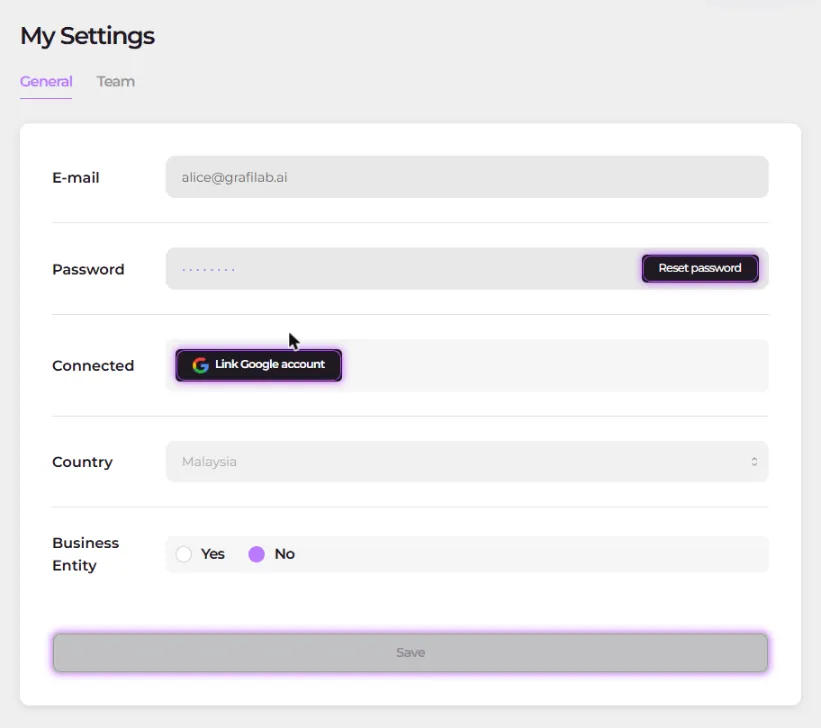
- E-mail —— 你用来登录的地址,只读显示。
- Password —— 打开 Change Password 对话框(步骤见下)。
- Connected —— 显示为已关联,或者在你用邮箱密码注册时提供 Link Google account。
- Country —— 决定钱包货币的国家/地区,可从完整国家列表中修改;货币规则见额度与账单。
- Business Entity —— Yes / No 二选一。选择 Yes 会展开 Business Registration Name、Business Registration No. 和 Business Address。
Save 提交该标签页。
修改密码:
-
在 General 标签页,Password 旁边打开 Change Password。
-
填写 Old Password、New Password 和 New Confirm Password。新密码至少 8 个字符,且至少包含一个数字、一个小写字母、一个大写字母和一个特殊字符。
-
提交对话框。其中的提示同样适用:“For security, you will be signed out once your password is changed and will need to sign in again.”。用新密码重新登录。
Logout 在每一页的控制台页头。它会先询问 “Are you sure you want to log out of your account?” 再把你登出。