

Account
团队与权限
读完本页,同事就能在你的 Grafilab 账号里工作 —— 部署实例、调用模型或充值 —— 且只拥有你授予的权限。
你仍然是账号所有者。成员用自己的凭据登录,然后切换进你的账号,操作你的钱包、你的实例和你的 API 密钥。账号之间不会转移任何东西:他们自己的账号不受影响,而他们以你的身份消费或创建的一切都属于你。
- 你自己的账号,或者一个你拥有 Admin (All) 的账号 —— Team 标签页仅管理员可见。
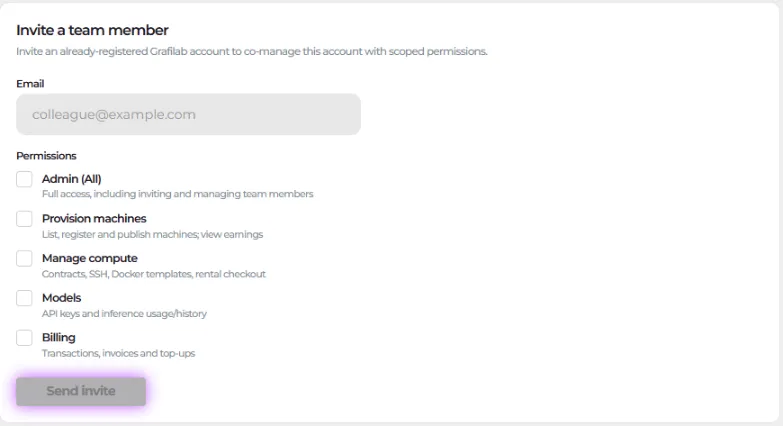
- 同事的 Grafilab 账号邮箱。邀请表单说得很清楚:“Invite an already-registered Grafilab account to co-manage this account with scoped permissions.”。他们要先自行注册。
- 想清楚他们需要哪些权限,参考下面的表格。
权限是一组勾选框,不是角色,你可以任意组合。
| 权限 | 辅助说明 | 开放的范围 |
|---|---|---|
| Admin (All) | Full access, including inviting and managing team members | 下面的全部内容,外加这个 Team 标签页。 |
| Provision machines | List, register and publish machines; view earnings | —— |
| Manage compute | Contracts, SSH, Docker templates, rental checkout | Compute、My Instance 和 Docker Templates。 |
| Models | API keys and inference usage/history | Playground、API 密钥和推理用量。 |
| Billing | Transactions, invoices and top-ups | Billing,以及页头的 Buy Credit 按钮。 |
一个权限都没有的成员,名字旁会显示 No permissions,登录后落在 Home,侧边栏基本是空的。打开他们没有权限的 URL 同样会跳回 Home,所以在让别人去部署之前先授予 Manage compute,让别人去充值之前先授予 Billing。
-
进入 My Settings → Team 标签页,打开 Invite a team member。
-
在 Email 中输入他们 Grafilab 账号的邮箱地址 —— 该字段的占位提示是
[email protected]。 -
参照上面的表格,勾选他们需要的 Permissions。
-
选择 Send invite。提示消息显示 “Invitation sent.”,成员表格新增一行,标记为 Pending,并显示 “Invited 8 Sept 2026”。
-
打开邀请链接,它指向
/team-invite?token=…。页面在你被授予的 Permissions 上方显示 “alice invited you to co-manage their Grafilab account.”。 -
选择 Accept invitation,或者用 Decline 拒绝。
-
确认页显示 “You now have access to alice. You can switch between accounts anytime from the account picker.”。选择 Go to dashboard。
账号选择器位于控制台页头。它用 Signed in as 显示你自己的账号,在你进入别人账号时显示 Acting as,并用 Switch account 在两者之间切换。

当你以另一个账号身份操作时,屏幕上会常驻一条横幅,带有 Switch back to my account。侧边栏只显示你权限允许的条目,Settings 只显示 Team 标签页,而来自另一个账号的详情页书签会被弹回其列表页。部分仅账号所有者可见的区域始终隐藏。
编辑或移除成员
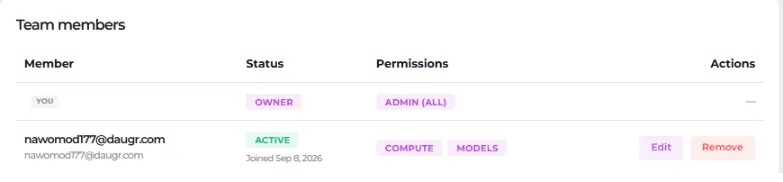
Section titled “编辑或移除成员”Team members 表格列出 Member / Status / Permissions / Actions,并带有 You、Owner 以及 Active 或 Pending 徽标。在你发出第一份邀请之前,它显示 “No other members yet. Invite someone above.”。
-
在该成员所在行选择 Edit。在 Edit permissions 里修改勾选框并 Save —— 提示消息显示 “Permissions updated.”。改动会在他们下次加载页面时生效。
-
要结束访问权限,选择 Remove。Remove member 对话框会警告 “Remove [email protected] from this account? Their access is revoked immediately.”。
-
决定如何处理他们的密钥。勾选 Also revoke the API keys this member created,让这些密钥随成员资格一起失效,然后确认。提示消息显示 “Member removed.”。