

Models
モデルを比較する
1 つのプロンプトを複数のモデルに同時に送り、回答を並べて読み、それらを 1 つの 最良の回答に統合できます。
- Models 権限のあるアカウント。 権限を参照してください。
- API キーを 1 つ以上と、残高のクレジット。比較は本物の キーで実行され、通常の API 呼び出しと同じようにモデルごとに 1 回課金されます。
比較画面を開く
Section titled “比較画面を開く”Models Playground のツールバーで Compare models をクリックします。ページのタイトルは Multi-model comparison で、Back でカタログに戻ります。
カテゴリータブの Text、Image、Video が、このページで扱えるモデルと パラメーターを決めます。構成を組む前にどれかを選んでください。
-
構成の下にある Add a model… をクリックし、Search models… で参加させる モデルを選びます。上限に達すると You can select a maximum of 6 models と表示され、それ以上は選べません。
-
API key セレクターでキーを選びます。Select an API key と表示され、キーが 1 つもない場合は No API keys available になります。キーは
Key #12として 一覧されます。 -
入力欄にプロンプトを入力し、Send をクリックします。Shift+Enter で改行でき、 Stop all ですべてのカードを一度に停止できます。
-
会話が始まると構成はロックされます。The model lineup is locked during a conversation. Start a new comparison to change models. Clear で記録を 消すとロックが解除されます。
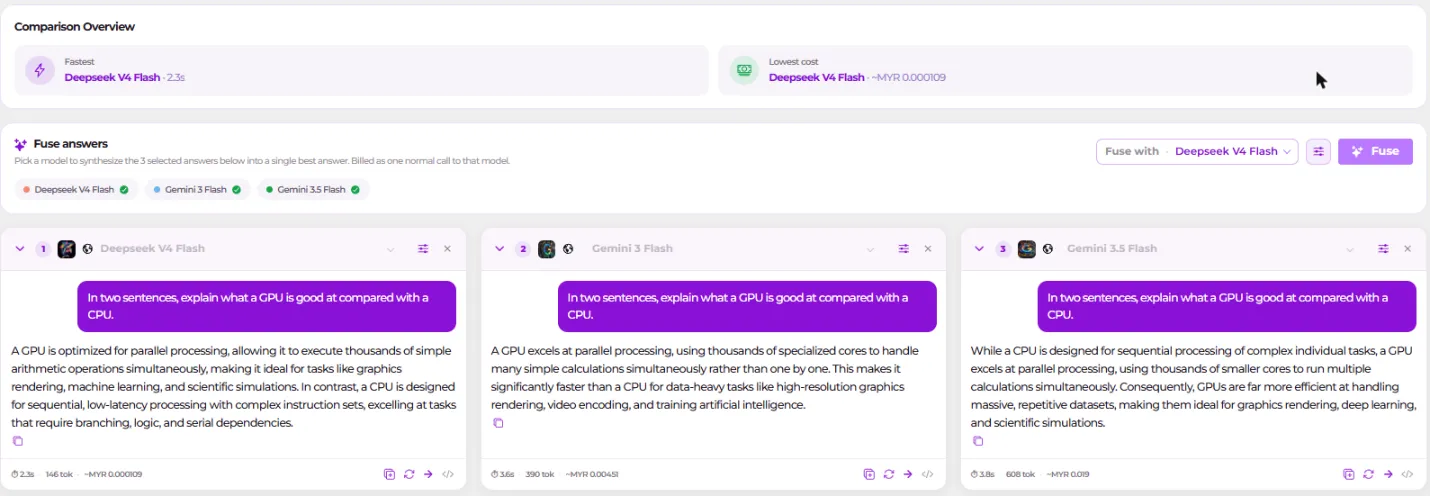
実行を調整し、カードを読む
Section titled “実行を調整し、カードを読む”設定パネルはすべてのモデルに適用されます。Temperature、Top P、 Max Tokens、Render as(Auto、Text、Markdown)です。Image と Video の タブには Number of Images、Duration (s)、Aspect ratio、 Resolution、Negative Prompt が加わり、それぞれ (not supported by all selected models) と注記されます。Reset to global defaults で元に戻せます。
Reference images(動画では Start frame)では Add image、 Replace image、Remove が使えます。Up to 10 images. The same references are sent to every selected model.
各カードには Expand/Collapse、Show rendered output / Show raw response、 Copy、Copy entire conversation、Regenerate、Continue with this model、Stop generating、Remove があります。Override params for this model は、そのモデルだけをグローバル設定から外します。空欄のままにした項目は グローバルの値に戻ります。ヘッダーには Pricing at launch、レート、レイテンシ、 そして Streaming…、Generating…、Failed のいずれかの状態が表示されます。
Comparison Overview カードは 2 つの賞を出します。Fastest(レイテンシ最小)と
Lowest cost(推定支出が最も安いもの。~cost として表示)です。それぞれの軸で
有効な候補が 2 つ以上必要で、足りなければ受賞なしになります。価格が不明なモデルは
自動的に勝つのではなく、対象から除外されます。
More actions → Bookmarks は、現在のモデルと設定を保存して後から読み込めるように
します。Save current as bookmark… で Save bookmark が開きます。Saves the
current category, selected models, and parameters under a name you can recall
later. プレースホルダーは e.g. My weekly benchmark です。保存した構成は同じ
メニューに並び、Delete bookmark で削除できます。1 つもない場合は No saved
bookmarks yet と表示されます。
回答を統合する
Section titled “回答を統合する”カードの下にある統合パネルにはこうあります。Pick a model to synthesize the 3 selected answers below into a single best answer. Billed as one normal call to that model.
含める回答にチェックを入れ、Fuse with で判定役のモデルを選び、Fuse を クリックします。Fuse settings には独自の Temperature と Top P に加えて Fusing instructions があります。Sent as the system prompt of the fuse call. Leave empty to use the default. 結果は Best fused answer に表示され、 Copy が使えます。Fuse again で再実行、Stop で停止します。

何に課金されるか
Section titled “何に課金されるか”N 個のモデルを実行すれば N 回の課金になり、統合するとさらに 1 回増えます。 すべての課金は、選択したキーに対して 推論の使用状況に記録されます。